
ISAS 2026
Camera-Ready Submission
The camera-ready submission is the final version of your paper, formatted and ready for publication without further edits.
For accepted full papers
Prepare your final paper
Follow the IEEE template, check your final PDF with PDF eXpress, and complete the copyright steps below.
- 01Add the copyright notice
- 02Check and approve your PDF
- 03Complete the IEEE copyright form
Before you start
- Papers cannot be revised after the camera-ready submission deadline shown in the symposium calendar.
- The camera-ready process applies to full papers only.
- After receiving your letter of acceptance, complete the steps below for IEEE publication.
Formatting checklist
- The IEEE paper template must be followed strictly. Papers that do not comply with the template will not be indexed by IEEE.
- Pages must not contain page numbers.
-
Add the IEEE copyright notice
As instructed by IEEE, one of the following copyright notices must be included in the footnote of the first page of the camera-ready paper:
IEEE copyright notices If… Copyright notice All authors are employed by the US government U.S. Government work not protected by U.S. copyrightAll authors are employed by a Crown government (UK, Canada and Australia) 979-8-3315-5238-1/26/$31.00 ©2026 CrownAll authors are employed by the European Union 979-8-3315-5238-1/26/$31.00 ©2026 European UnionAll other papers 979-8-3315-5238-1/26/$31.00 ©2026 IEEE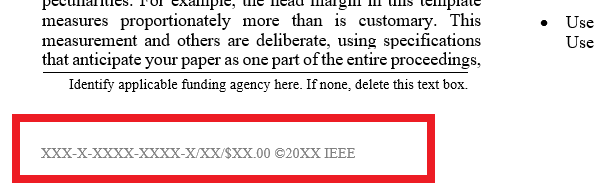
Example placement of the copyright notice. -
Check your PDF with IEEE PDF eXpress
Conference ID
70650XGo to the IEEE PDF eXpress site (opens in a new tab).
First time using PDF eXpress
- Create an account on the IEEE PDF eXpress site. Create an account (opens in a new tab)
- Enter the conference ID, your email address and a password.
- Continue to enter information as prompted. An online confirmation is displayed and an email is sent to verify your account.
- After activating your account, log in. If you are logging in for the first time, complete the personal information form.
Already used PDF eXpress for another conference
- Enter the conference ID.
- Enter the email address and password you used before, then log in.
After logging in
- Upload your paper using the “Dashboard → Create New Title” menu.
- If your PDF eXpress-generated PDF is ready for submission, click “Approve” to submit it to the Conference Editor. In addition, email the PDF to the symposium address without changing the file name assigned by PDF eXpress.
- If your paper does not pass the PDF eXpress check, correct the errors listed in the email you receive and repeat the process.
Symposium email address: symposium.isas@gmail.com

PDF eXpress dashboard: Create New Title 
PDF eXpress: approving the generated PDF 
PDF eXpress: example of a failed check notification -
Submit the IEEE copyright form
After the camera-ready papers are collected, one corresponding author of each paper will receive an email from IEEE with a link and credentials to submit the IEEE copyright form for the paper.


Camera-ready deadline: . Papers cannot be changed after this date.
Questions about the camera-ready process? Contact symposium.isas@gmail.com and include your Paper ID.